How Much Power Supply Do You Actually Need? A Practical Wattage Guide

What PSU Wattage Actually Covers
Your power supply doesn't just feed your GPU. It powers your CPU, motherboard, every drive, your fans, and anything plugged into a header. The GPU is usually the biggest single draw, but it's rarely the only thing that matters.
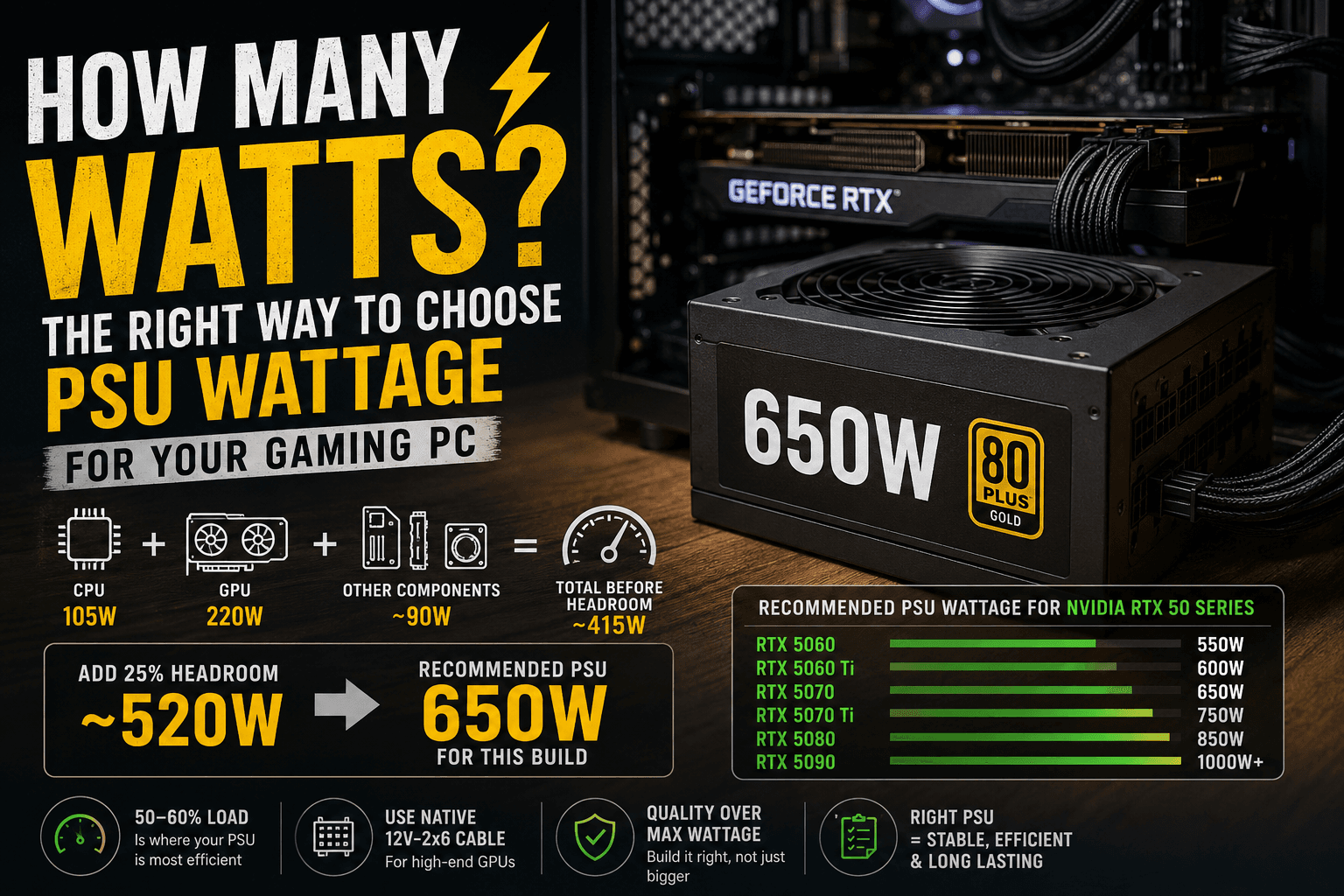
A simple, reliable formula: add your CPU's TDP to your GPU's TDP, add roughly 90 watts for everything else (motherboard, RAM, drives, fans), then add about 25 percent on top as headroom. That headroom isn't wasted capacity. It exists because your components rarely run at a steady, predictable draw, and running a PSU too close to its limit shortens its lifespan and hurts efficiency.
On my own current build, a 105W CPU paired with a GPU rated for 220W comes out to roughly 415W once you add the baseline 90W, before headroom. Adding 25 percent on top lands right around 520W, which is why a 650W unit is a comfortable, correctly sized choice rather than an underpowered one, even though neither individual component number looks that high on its own.
Real Numbers for Current GPUs
NVIDIA's own recommended PSU wattage for the RTX 50 series gives a solid baseline, and it already accounts for a high-end CPU paired with the card, so a mid-range CPU leaves you extra margin beyond these numbers.
RTX 5060: 550W RTX 5060 Ti: 600W RTX 5070: 650W RTX 5070 Ti: 750W RTX 5080: 850W (the card itself draws around 360W) RTX 5090: 1000W minimum, and this is the one card where I'd genuinely consider going higher, more on that below
AMD's current RX 9070 series sits in a broadly similar range to the RTX 5070 lineup, so the same formula applies even if you're not buying green.
Why Bigger Isn't Always Better
Here's something most buying guides never explain: a PSU is most efficient when it's running at roughly 50 to 60 percent of its rated capacity, not near its maximum and not barely loaded either.
Buying a 1000W unit for a build that only draws 400W under gaming load means you're running at around 40 percent load, which isn't dangerous, but it also isn't buying you anything. You paid for capacity you'll likely never touch, when that money could have gone toward a better-built 650W or 750W unit with cleaner power delivery and a quieter fan curve. Match the wattage to your actual build, not to the biggest number you can afford.
The One Case Where You Should Not Undersize: The RTX 5090
The RTX 5090 deserves a specific callout. Independent testing has recorded its power draw briefly spiking well above its rated 575W figure during real gameplay, in some cases approaching 900W for fractions of a second. A PSU sitting right at the minimum recommended wattage can trip its protection circuitry during one of these spikes, even though the average draw never gets close to that number.
If you're building around a 5090, treat NVIDIA's 1000W recommendation as a genuine floor, not generous padding, and consider 1200W if you're pairing it with a high-end CPU or running extra drives and fans.
The Connector Detail Worth Knowing
Modern high-end GPUs use the 12V-2x6 connector, an updated version of the 12VHPWR cable that saw a well-documented history of connector issues on earlier high-wattage cards. If you're buying a new PSU for a 5080 or 5090, look for one with a native 12V-2x6 cable rather than relying on an adapter bundled with the GPU. A properly seated native cable handles sustained high current more reliably than an adapter chain, and it's a small detail that genuinely matters at this power level.
Common Mistakes to Avoid
Buying based on GPU wattage alone. Your CPU, drives, and fans all draw from the same PSU. Ignoring them can leave you closer to the edge than the GPU's number alone suggests.
Assuming an old PSU will handle a new high-end GPU. Even if the wattage number looks sufficient on paper, older units may lack the connector standard or transient response modern high-draw cards need.
Chasing 80 Plus Platinum on a budget build. Efficiency certification matters more as your wattage and usage hours climb. On a modest build, a solid Bronze or Gold unit from a reputable brand is genuinely fine, and the savings are better spent elsewhere.
Reusing adapters across GPU generations. A 6+2 pin adapter from an old card isn't a substitute for the correct native connector on a new high-wattage GPU. Use the cable that actually comes with your PSU or GPU.
Overlooking modularity for the sake of a slightly lower price. A fully modular PSU only connects the cables you actually need, which makes airflow and cable management noticeably easier, especially in smaller cases. It's not essential, but on a tight budget I'd rather drop 10W of headroom than end up fighting a case full of unused cables.
Wrapping Up
Add your CPU and GPU TDP, account for the rest of your system, and build in real headroom rather than chasing the biggest number available. For most current builds, that lands you somewhere between 650W and 850W, with the RTX 5090 being the clear exception that justifies going bigger.
If you've already checked whether your CPU is bottlenecking your GPU or whether your RAM setup is holding you back, sizing your power supply correctly is the next piece of making sure your build actually performs the way it's supposed to. Browse more build guides like this on the FixPlay homepage as you plan the rest of your system.

Written by
Kashif
Founder & Lead Editor, FixPlay
Kashif is the founder and lead editor at FixPlay, covering PC hardware, console gaming, and breaking industry news since 2021. He builds and benchmarks his own test rigs before writing any hardware guide, and has covered major releases including GTA 6, Elden Ring, and Call of Duty season updates. His GPU and settings guides are based on hands-on testing, not spec-sheet guesses.
View all posts by Kashif

0 Comments
No comments yet - be the first to share your thoughts.